Appearance
一、向量数据库- 简介
存储和搜索非结构化散据的最常见方法之一是将其嵌入并存储生成的嵌入向量, 然后在査询时嵌入非结构化查询并检索与嵌入查询“最相似”的嵌入向量。 向量存储负责存储嵌入数据并执行向量搜索,为您处理这些。
1 Chroma
Chroma 是一个开源的向量数据库,专注于简化文本嵌入的存储和检索过程。Chroma 采用 Apache 2.0 许可证。它的主要特点包括:
- 支持多种存储后端:Chroma支持多种底层存储选项,如DuckDB(适用于独立应用)和ClickHouse(适用于大规模扩展)。
- 多语言支持:Chroma提供了Python和JavaScript/TypeScript的SDK,方便开发者快速集成。
- 简单易用:Chroma的设计理念是“简单至上”,旨在提升开发者的效率
- 高性能:Chroma不仅支持快速的相似度搜索,还提供了对搜索结果的分析功能。
2 FAISS
Faiss是由facebook AI Research团队开发的一个库,旨在高效地进行大规模向量相似性搜索,它不仅支持CPU,还能利用GPU进行加速,非常适合处理大量高维数据。Faiss提供了多种索引类型,以适应不同的需求,从简单的平面索引(flat ndex)到更复杂的倒排文件索引(IVF)和乘积量化索引(PQ)。
几万-几百万条数据推荐使用
3 Milvus
3.1 Milvus 基本介绍
Milvus 由 Ziiz 开发,并捐赠给了 Linux 基金会下的 LF AI& Data 基金会,现已成为世界领先的开源向量数据库项目之- . 什么是向量数据库:传统的数据库主要处理结构化数据,而向量数据库则专注于处理非结构化数据经过嵌入模型(embedding model)转换而来的向量数据。这些向量是高维空间中的点,它们捕获了原始数据的语义信息,向量数据库的核心能力是进行 相似性搜索,,即根据查询向量找到最相似的向量,从而实现语义级别的搜索和匹配。
Milvus 采用 Apache 2.0 许可发布,大多数贡献者都是高性能计算(HPC)领域的专家,擅长构建大规模系统和优化硬件感知代码
二、向量数据库- 使用
1 FAISS
1.1 创建与插入数据
bash
pip install faiss-cpu / faiss-gpupython
# faiss_demo1
import faiss
from langchain_community.docstore import InMemoryDocstore
from langchain_community.embeddings import HuggingFaceEmbeddings
from langchain_community.vectorstores import FAISS
from langchain_core.documents import Document
from sqlalchemy.testing.suite.test_reflection import metadata

from vector_db.custom_embedding import CustomQwen3Embedding

# 向量数据不等于关系型数据库
# FAISS向量数据库: pip install faiss-cpu / faiss-gpu


# # 模型名称
# model_name = "BAAI/bge-small-en-v1.5"
# # 使用的设备为cuda
# model_kwargs = {'device': 'cpu'}
# # set True to compute cosine similarity
# encode_kwargs = {'normalize_embeddings': True}
#
# hf_embedding = HuggingFaceEmbeddings(
#     model_name=model_name,
#     model_kwargs=model_kwargs,
#     encode_kwargs=encode_kwargs,
# )


hf_embedding = CustomQwen3Embedding("Qwen/Qwen3-Embedding-0.6B")

# 1 初始化数据库

# 先创建索引
# index = faiss.IndexFlatL2(1024)
index = faiss.IndexFlatL2(len(hf_embedding.embed_query('Hello world!')))
vector_store = FAISS(
    embedding_function=hf_embedding,
    index=index,
    docstore=InMemoryDocstore(),
    index_to_docstore_id={}
)

# 2 装备数据 (所有数据都必须是Document)
# page_content 一定要经过向量化,因为需要通过语义检索
# metadata 不需要经过向量化,可以随意指定
document_1 = Document(
    page_content='今天早餐我吃了巧克力薄煎饼和炒蛋。',
    metadata={'source': 'tweet', 'time': '上午'}
)

document_2 = Document(
    page_content='明天的天气预报是阴天多云,最高气温6华氏度。',
    metadata={'source': 'news'}
)

document_3 = Document(
    page_content='正在用Langchain构建一个激动人心的新项目一快来看看吧!',
    metadata={'source': 'tweet'}
)

document_4 = Document(
    page_content='劫匪闯入城市银行,盗走了100万美元现金。',
    metadata={'source': 'news'}
)

document_5 = Document(
    page_content='哇!那部电影太精彩了,我已经迫不及待想再看一遍。',
    metadata={'source': 'tweet'}
)

document_6 = Document(
    page_content='新iPhone值得这个价格吗?阅读这篇评测一探究竟。',
    metadata={'source': 'website'}
)

document_7 = Document(
    page_content='当今世界排名前十的足球运动员。',
    metadata={'source': 'website'}
)

document_8 = Document(
    page_content='LangGraph是构建有状态智能体应用的最佳框架!',
    metadata={'source': 'tweet'}
)

document_9 = Document(
    page_content='由于对经济衰退的担忧,今日股市下跌500点。',
    metadata={'source': 'news'}
)

document_10 = Document(
    page_content='我有种不好的预感,我要被删除了 :(',
    metadata={'source': 'tweet'}
)

documents = [
    document_1,
    document_2,
    document_3,
    document_4,
    document_5,
    document_6,
    document_7,
    document_8,
    document_9,
    document_10,
]

# 唯一id索引必须是字符串
ids = ['id' + str(i + 1) for i in range(len(documents))]

# 加入数据
vector_store.add_documents(documents, ids=ids)

# 3 语义检索
results = vector_store.similarity_search('今天的投资建议是什么', k=2)
# results = vector_store.similarity_search('有美食的内容吗', k=2)

for res in results:
    print(type(res))
    print(res.id)
print(f"* {res.page_content} [{res.metadata}]")1.2 数据持久化-写入磁盘
python
# 4 持久化:把数据库写入到磁盘中
vector_store.save_local('../faiss_db')1.3 从磁盘加载数据
python
hf_embedding = CustomQwen3Embedding("Qwen/Qwen3-Embedding-0.6B")

# 从磁盘去加载数据库
vector_store = FAISS.load_local('../faiss_db', embeddings=hf_embedding, allow_dangerous_deserialization=True)1.4 带分数的语义向量检索
python
# 3 语义检索-向量查询
# results = vector_store.similarity_search('今天的投资建议是什么', k=2)
# 查询结果带分数
results = vector_store.similarity_search_with_score('有美食的内容吗', k=2)

for res, score in results:
    print(type(res))
    print(res.id)
print(f"* [Score={score: 3f}] {res.page_content} [{res.metadata}]")1.5 过滤查询
python
# 过滤查询
results = vector_store.similarity_search_with_score('有美食的内容吗', k=2, filter={'source': 'tweet'})

for res, score in results:
    print(type(res))
    print(res.id)
print(f"* [Score={score: 3f}] {res.page_content} [{res.metadata}]")1.6 删除
python
# 删除-只支持根据 id 进行删除
vector_store.delete(ids=['id10'])2 Chroma
sh
pip install -qU langchain-chromapython
# chroma_demo1
from langchain_chroma import Chroma
from langchain_core.documents import Document

from vector_db.custom_embedding import CustomQwen3Embedding

hf_embedding = CustomQwen3Embedding("Qwen/Qwen3-Embedding-0.6B")

vector_store = Chroma(
    collection_name='t_news',
    embedding_function=hf_embedding,
    persist_directory='../chroma_db'
)

# 2 装备数据 (所有数据都必须是Document)
# page_content 一定要经过向量化,因为需要通过语义检索
# metadata 不需要经过向量化,可以随意指定
document_1 = Document(
    page_content='今天早餐我吃了巧克力薄煎饼和炒蛋。',
    metadata={'source': 'tweet', 'time': '上午'}
)

document_2 = Document(
    page_content='明天的天气预报是阴天多云,最高气温6华氏度。',
    metadata={'source': 'news'}
)

document_3 = Document(
    page_content='正在用Langchain构建一个激动人心的新项目一快来看看吧!',
    metadata={'source': 'tweet'}
)

document_4 = Document(
    page_content='劫匪闯入城市银行,盗走了100万美元现金。',
    metadata={'source': 'news'}
)

document_5 = Document(
    page_content='哇!那部电影太精彩了,我已经迫不及待想再看一遍。',
    metadata={'source': 'tweet'}
)

document_6 = Document(
    page_content='新iPhone值得这个价格吗?阅读这篇评测一探究竟。',
    metadata={'source': 'website'}
)

document_7 = Document(
    page_content='当今世界排名前十的足球运动员。',
    metadata={'source': 'website'}
)

document_8 = Document(
    page_content='LangGraph是构建有状态智能体应用的最佳框架!',
    metadata={'source': 'tweet'}
)

document_9 = Document(
    page_content='由于对经济衰退的担忧,今日股市下跌500点。',
    metadata={'source': 'news'}
)

document_10 = Document(
    page_content='我有种不好的预感,我要被删除了 :(',
    metadata={'source': 'tweet'}
)

documents = [
    document_1,
    document_2,
    document_3,
    document_4,
    document_5,
    document_6,
    document_7,
    document_8,
    document_9,
    document_10,
]

# 唯一id索引必须是字符串
ids = ['id' + str(i + 1) for i in range(len(documents))]

vector_store.add_documents(documents, ids=ids)

# 3 语义检索
# results = vector_store.similarity_search('今天的投资建议是什么', k=2)
results = vector_store.similarity_search('有美食的内容吗', k=2)

for res in results:
    print(type(res))
    print(res.id)
print(f"* {res.page_content} [{res.metadata}]")三、案例-上下文感知GAG
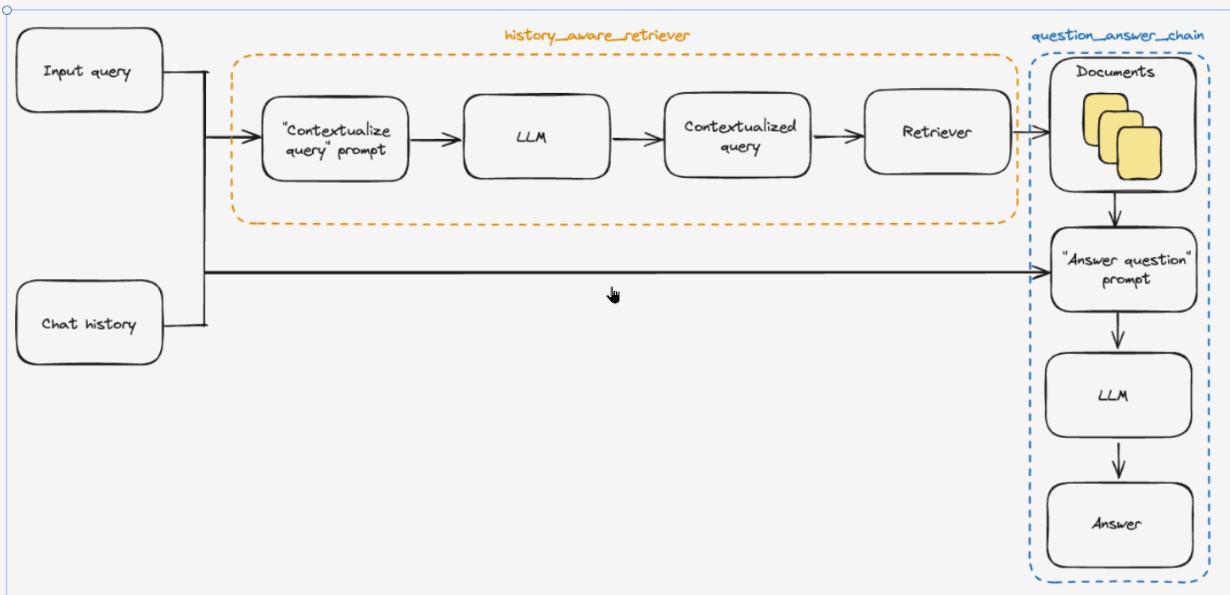
python
import bs4
from langchain.chains.combine_documents import create_stuff_documents_chain
from langchain.chains.history_aware_retriever import create_history_aware_retriever
from langchain.chains.retrieval import create_retrieval_chain
from langchain_chroma import Chroma
from langchain_community.document_loaders import WebBaseLoader
from langchain_core.chat_history import InMemoryChatMessageHistory
from langchain_core.documents import Document
from langchain_core.prompts import ChatPromptTemplate, MessagesPlaceholder
from langchain_core.runnables import RunnableWithMessageHistory
from langchain_text_splitters import RecursiveCharacterTextSplitter

from vector_db.custom_embedding import CustomQwen3Embedding

# import ssl
#
# # 禁用 SSL 证书验证(仅用于测试)
# ssl._create_default_https_context = ssl._create_unverified_context


hf_embedding = CustomQwen3Embedding("Qwen/Qwen3-Embedding-0.6B")

# 1 构建向量数据
vector_store = Chroma(
    collection_name='t_agent_blog',
    embedding_function=hf_embedding,
    persist_directory='../chroma_db'
)


# https://lilianweng.github.io/posts/2023-06-23-agent/


def create_dense_db():
    """把网络的关于Agent的博客数据写入向量数据库"""
    loader = WebBaseLoader(
        web_path=('https://lilianweng.github.io/posts/2023-06-23-agent/',),
        bs_kwargs=dict(
            # pip install beautifulsoup4
            # 使用BeautifulSoup解析器,只解析特定的class的内容
            parse_only=bs4.SoupStrainer(
                # 指定要解析的HTML类名
                class_=('post-content', 'post-title', 'post-header')
            )
        )
    )

    # 如需跳过SSL验证错误:
    loader.requests_kwargs = {'verify': False}

    docs_list = loader.load()

    # 切割 - 真实项目不推荐-因为段落不完整,可以用作学习
    # 初始化文本分割器,设置块大小1000, 重叠200
    text_splitter = RecursiveCharacterTextSplitter(chunk_size=1000, chunk_overlap=200)
    # 分割文档
    splits = text_splitter.split_documents(docs_list)
    print('doc的数量: ', len(splits))

    # 把doc写入向量数据库
    ids = ['id' + str(i + 1) for i in range(len(splits))]
    vector_store.add_documents(documents=splits, ids=ids)


# 问题上下文化
# 系统提示词:用于将带有聊天历史的问题转化为独立问题
contextualize_q_system_prompt = (
    "给定聊天历史和最新的用户问题(可能引用聊天历史中的上下文),"
    "将其重新表述为一个独立的问题(不需要聊天历史也能理解)。"
    "不要回答问题,只需在需要时重新表述问题,否则保持原样。"
)
# 创建聊天提示词模板
contextualize_q_prompt = ChatPromptTemplate.from_messages(
    [
        # 系统角色提示
        ("system", contextualize_q_system_prompt),
        # 聊天历史占位符
        MessagesPlaceholder("chat_history"),
        # 用户输入占位务
        ("human", "{input}"),
    ]
)

# 创建一个向量数据库的检索器
retriever = vector_store.as_retriever(search_kwargs={'k': 2})

# 创建一个上下文感知的检索器
history_aware_retriever = create_history_aware_retriever(
    llm,
    retriever,
    contextualize_q_prompt
)

"""RAG"""
# 回答问题
# 系统提示词:定义助手的行为和回答规范
system_prompt = (
    "你是一个问答任务助手",
    "使用以下检索的上下文来回答问题。"
    "如果不知道答案,你就说不知道。"
    "回答最多三句话,保持简介"
    "\n\n"
    "{context}"  # 从向量数据库中检索出来的doc
)
# 创建问答提示模板
qa_prompt = ChatPromptTemplate.from_messages(
    [
        ("system", system_prompt),
        MessagesPlaceholder("chat_history"),
        ("human", "{input}"),
    ]
)

# 创建文档处理链
question_action = create_stuff_documents_chain(llm, qa_prompt)
# 创建RAG检索链
rag_chain = create_retrieval_chain(history_aware_retriever, question_action)
# rag_chain.invoke()

# 对话内容存储到内存中
store = {}


def get_session_history(session_id: str):
    if session_id not in store:
        store[session_id] = InMemoryChatMessageHistory()
    return store[session_id]


# 创建带历史记录功能的处理链
conversational_rag_chain = RunnableWithMessageHistory(
    rag_chain,
    get_session_history,
    input_messages_key='input',
    history_messages_key='chat_history',
    output_messages_key='answer'
)

# 调用会话RAG链,询问 什么事任务分解?
resp1 = conversational_rag_chain.invoke(
    {'input': 'What is Task Decomposition?'},
    config={
        'configurable': {'session_id': 'ab123'}
    }
)
print(resp1['answer'])

resp2 = conversational_rag_chain.invoke(
    {'input': 'What are common ways of doing it?'},
    config={
        'configurable': {'session_id': 'ab123'}
    }
)
print(resp2['answer'])

# if __name__ == '__main__':
#     create_dense_db()