Appearance
JavaScript
TIP
一个支持 IE9 以上及 webkit 内核浏览器中用于记录页面加载和解析过程中关键时间点的机制。
一、缓存淘汰算法
1 FIFO
- FIFO (First Input First Output)可以说是最简单的一种缓存算法
- 通过设置缓存上限,当达到了缓存上限的时候,按照先进先出的策略进行淘汰,再增加进新的 key-value
js
// 使用了一个对象作为缓存,一个数组配合着记录添加进对象时的顺序
// 判断是否到达上限,若到达上限取数组中的第一个元素key,对应删除对象中的键值
class FifoCache {
  constructor(limit) {
    this.limit = limit || 10;
    this.map = {}; // 保存键值信息
    this.keys = []; // 记录key的个数
  }

  set(key, value) {
    // 1 判断keys的长度是否达到限制
    if (this.keys.length >= this.limit) {
      let i = this.keys.indexOf(key);
      if (i >= 0) {
        // 如果达到限制判断key是否已经存在,存在将key删除
        this.keys.splice(i, 1);
      } else {
        // 否则默认删除keys的第一个数据与对应map中的值
        delete this.map[this.keys.shift()];
      }
    }
    // 2 没达到限制直接追加(由于大于限制的时候会移除最前面的一个,新的都要添加进去)
    this.keys.push(key);
    this.map[key] = value;
  }

  get(key) {
    return this.map[key];
  }
}

// 测试
let fifo = new FifoCache(2);
fifo.set("a", "a");
fifo.set("b", "b");
fifo.set("c", "c");
console.log(fifo.get("b")); // 'b'
console.log(fifo.get("c")); // 'c'2 LRU
- LRU(Least recently used)算法算是最常见的缓存淘汰算法
- 根据数据的历史访问记录来进行淘汰数据,其核心思想是如果数据最近被访问过,那么将来被访问的几率也更高
js
// 按照首位淘汰来编码,超过容量就把首位删除,然后追加新的到最后面
var LRUCache = function (capacity) {
  this.cache = new Map(); // 缓存
  this.capacity = capacity || 10; // 容量
};

// 先判断是否存在,如果存在需要将当前取出的key和value更新到最后
LRUCache.prototype.get = function (key) {
  let cache = this.cache;
  if (cache.has(key)) {
    let temp = cache.get(key);
    cache.delete(key);
    cache.set(key, temp); // 更新最新的值
    return temp;
  } else {
    return -1;
  }
};

// 存放的时候,先判断是否存在,已经存在删除重新加,如果不存在但是超过容量,需要删除首位,然后最近加到末位
LRUCache.prototype.put = function (key, value) {
  let cache = this.cache;

  if (cache.has(key)) {
    // 如果已经存在对应的key,需要删除
    cache.delete(key);
  } else if (cache.size >= this.capacity) {
    // 如果超过容量,需要将第一位的删除
    cache.delete(cache.keys().next().value);
  }

  cache.set(key, value);
};

// 测试
let lru = new LRUCache(2);
lru.put("a", { a: 1 });
lru.put("b", { b: 2 });
lru.put("c", { c: 3 });

console.log(lru);
console.log(lru.get("b"));
console.log(lru);

// LRUCache { cache: Map { 'b' => { b: 2 }, 'c' => { c: 3 } }, capacity: 2 }
// { b: 2 }
// LRUCache { cache: Map { 'c' => { c: 3 }, 'b' => { b: 2 } }, capacity: 2 }3 LFU
- LFU(Least Frequently Used )也是一种常见的缓存算法
- 当空间满时,通过访问次数,淘汰问次数最小的数据,如果访问次数全部一样则默认淘汰最初添加的数据
js
var LFUCache = function (capacity) {
  this.capacity = capacity;
  this.cache = new Map(); // 存放值和频率{value: value,freq: 1}
  this.useMap = new Map(); // 记录使用次数
};

LFUCache.prototype.get = function (key) {
  if (!this.cache.has(key)) return -1;
  // 获取值的时候,如果已经存在,需要删除原来的重新添加使用的次数也需要+1
  let use = this.useMap.get(key);
  let value = this.cache.get(key);
  this.cache.delete(key);
  this.useMap.set(key, use + 1);
  this.cache.set(key, value);
  return value;
};

LFUCache.prototype.put = function (key, value) {
  // 边界条件
  if (this.capacity === 0) return;
  // 获取使用次数的最小值
  let min = Math.min(...this.useMap.values());
  if (this.cache.has(key)) {
    // 如果已经存在,需要重新赋值,次数+1
    this.cache.set(key, value);
    let use = this.useMap.get(key);
    this.useMap.set(key, use + 1);
  } else {
    this.cache.set(key, value);
    this.useMap.set(key, 1);
  }
  // 如果容量超出了,需要删除使用次数最少的,如果最小次数一样,则按照时间,删除最早添加的
  if (this.cache.size > this.capacity) {
    let it = this.cache.keys();
    let delKey = it.next().value;
    while (this.useMap.get(delKey) != min) {
      delKey = it.next().value;
    }
    this.useMap.delete(delKey);
    this.cache.delete(delKey);
  }
};

// 测试
let lfu = new LFUCache(1);
lfu.put(1, 1);
lfu.put(2, 2);
lfu.get(1); // 返回 1
lfu.put(3, 3); // 去除 key 2
lfu.get(2); // 返回 -1 (未找到key 2)
lfu.get(3); // 返回 3
lfu.put(4, 4); // 去除 key 1
lfu.get(1); // 返回 -1 (未找到 key 1)
lfu.get(3); // 返回 3
lfu.get(4); // 返回 4二、函数式编程
- 函数式编程是一种编程范式,主要是利用函数把运算过程封装起来,通过组合各种函数来计算结果
1 高阶函数
- 一个函数返回一个函数
- 一个函数的参数可以接受一个函数
js
// 给核心代码的前面或者后面进行扩展方法,类似AOP编程

// 核心代码
function core(...args) {
  // ...
  console.log("core", args);
  // ....
}

// 给core函数增加一些额外的逻辑 但是不能更改核心代码
Function.prototype.before = function (cb) {
  return (...args) => {
    cb(); // 执行扩展方法
    this(...args); // this = core 执行原有方法
  };
};

// 调用方式
let newCore = core.before(() => {
  // TODO 处理扩展的逻辑
  console.log("before");
});

newCore("a", "b");

// before
// core [ 'a', 'b' ]js
// 上述的核心思想就是 在两个函数执行的外面包一层函数
let newCore = () => {
  before();
  core();
};2 纯函数
- 对于相同的输入,永远会得到相同的输出,而且没有任何可观察的副作用,也不用依赖外部环境的状态
- 例子: 数学公式 y = f(x)
js
// 纯函数,计算结果不需要依赖外部变量
function sum(a, b) {
  return a + b;
}
console.log(sum(1, 2)); // 3js
let arr = [1, 2, 3, 4, 5];

// 纯函数
console.log(arr.slice(0, 3)); // [ 1, 2, 3 ]
console.log(arr.slice(0, 3)); // [ 1, 2, 3 ]3 非纯函数
- 非纯函数中,函数的行为需要由外部的系统环境决定,这也输造成系统复杂性大大增加的主要原因
js
// 非纯函数,sum的计算结果依赖外部变量a,当a发生变化的时候,计算结果也发生了变化
let a = 10;
function sum(b) {
  return a + b;
}
console.log(sum(1)); // 11js
let arr = [1, 2, 3, 4, 5];

// 非纯函数
console.log(arr.splice(0, 3)); // [ 1, 2, 3 ]
console.log(arr.splice(0, 3)); // [ 4, 5 ]4 函数科里化
定义:向函数传递一部分参数来调用它,让他返回一个函数去处理剩下的参数
通俗来讲:把多个参数的传入,转化为 n 个函数来处理,可以有暂存变量的功能
将一个多参数函数转换成多个单参数函数,也就是将一个 n 元函数转换成 n 个一元函数
参数个数确定的函数科里化通用方法
js
// 记录每次调用时传入的参数,并且和函数的参数个数进行比较,
// 如果不满足总个数 就返回新函数,
// 如果传入的个数和参数一致  执行原来的函数

// 写法一,利用一个数组每次存储传入的参数
function curring(fn) {
  // 存储每次调用时传入的参数
  let inner = (args = []) => {
    return args.length >= fn.length
      ? fn(...args) // 执行原函数
      : (...userArgs) => inner([...args, ...userArgs]); // 递归返回函数,合并参数
  };
  return inner();
}

// 写法二,每次展开参数传递到下一层
function curring(fn) {
  let inner = (...args) => {
    return args.length >= fn.length
      ? fn(...args) // 执行原函数
      : (...userArgs) => inner(...args.concat(...userArgs)); // 递归返回函数,合并参数
  };
  return inner;
}- 使用案例
js
// 求和使用
function sum(a, b, c, d) {
  return a + b + c + d;
}
let sum1 = curring(sum); // 科里化

// 分布调用
let sum2 = sum1(1);
let sum3 = sum2(2, 3);
let result = sum3(4);
console.log(result); // 10

// 一行调用
console.log(sum1(1)(2, 3)(4));js
// 封装类型判断
function isType(typing, val) {
  return Object.prototype.toString.call(val) == `[object ${typing}]`;
}

let util = {};
["String", "Number", "Boolean", "Null", "Undefined"].forEach((type) => {
  util["is" + type] = curring(isType)(type);
});
console.log(util.isString("abc"));- 一道不定参数的面试题
js
// 实现一个add方法,使计算结果能够满足如下预期:
add(1)(2)(3) = 6;
add(1, 2, 3)(4) = 10;
add(1)(2)(3)(4)(5) = 15;

function sum1 (...args) {
	// 初始化参数需要带上
	let argsAll = [...args];
	let inner = (...args) => {
		if (args.length === 0) {
			// 判断最后一次传入的参数为0的时候,执行函数计算
			return argsAll.reduce((a, b) => a + b);
		} else {
			argsAll.push(...args);
			return inner; // 返回当前函数
		}
	}
	return inner;
}

console.log(sum1(1)(2)(3)()); // 6
console.log(sum1(1, 2, 3)(4)()); // 10
console.log(sum1(1)(2)(3)(4)(5)()); // 155 偏函数
- 固定一个函数的一个或者多个参数,也就是将一个 n 元函数转换成一个 n - x 元函数
js
function ajax(url, data, callback) {
  console.log(url, data, callback);
}

// 原始调用
function ajaxTest1(data, callback) {
  ajax("http://www.test.com/test1", data, callback);
}
function ajaxTest2(data, callback) {
  ajax("http://www.test.com/test2", data, callback);
}

// 偏函数调用
const partial = (fn, ...args) => {
  return (...laterArgs) => {
    let allArgs = args.concat(laterArgs);
    return fn.apply(this, allArgs);
  };
};

var ajaxTest1 = partial(ajax, "http://www.test.com/test1");
var ajaxTest2 = partial(ajax, "http://www.test.com/test2");6 反柯里化
- 扩大函数的适用范围,比如借用方法
js
// 通用函数
function unCurrying(fn) {
  return (tar, ...args) => fn.apply(tar, args);
}
// 借用数组的push方法
const push = unCurrying(Array.prototype.push);

const obj = { a: "a" };
push(obj, "b", "c", "d");
console.log(obj);
// { '0': 'b', '1': 'c', '2': 'd', a: 'a', length: 3 }7 函数收敛
- 把数组转化为一个结果集
js
// reduce 收敛函数的使用
// previousValue, currentValue, index, arr
// 初始值          当前值        索引    原数组
let r = [1, 2, 3, 4, 5].reduce(function (
  previousValue,
  currentValue,
  index,
  arr
) {
  console.log(previousValue, currentValue);
  return previousValue + currentValue;
},
0);
// 第二个参数为初始值,如果没有则默认使用数组中的第一个元素作为初始值
console.log(r); // 15- reduce 实现原理
js
Array.prototype.reduce = function (callback, prev) {
  for (let i = 0; i < this.length; i++) {
    if (!prev) {
      // 如果prev为空,则初始值为数组第一项
      prev = callback(this[i], this[i + 1], i + 1, this);
      i++; // 下次从3开始
    } else {
      prev = callback(prev, this[i], i, this);
    }
  }
  return prev;
};8 函数组合
- 把层层嵌套的函数调用,拆分为组合式函数调用
js
function sum(a, b) {
  return a + b;
}
function len(str) {
  return str.length;
}
function addPrefix(str) {
  return "$" + str;
}

// 最开始的调用方式:包菜式代码
let r = addPrefix(len(sum("a", "b")));
console.log(r); // $2- 组合调用-reduceRight
js
// 从右往左依次执行,需要对第一次进行特殊处理
const compose = (...fns) => {
  return function (...args) {
    let lastFn = fns.pop(); // 取出最后一个
    let lastRes = lastFn(...args); // 最后一个函数执行
    // 计算函数
    return fns.reduceRight((prev, current) => {
      return current(prev);
    }, lastRes);
  };
};

let final = compose(addPrefix, len, sum);
console.log(final("a", "b"));

// 简写
const compose =
  (...fns) =>
  (...args) => {
    let lastFn = fns.pop();
    return fns.reduceRight((prev, current) => current(prev), lastFn(...args));
};- 组合调用-reduce
js
// 第一次  a: addPrefix   b:len
// 第二次  a: function(...args) {return addPrefix(len(...args))}   b:sum
// 第三次
// function(...args) {
//     return (function(...args) {return addPrefix(len(...args))})(sum(...args))
// }
// 最终结果
// function(...args) {
//     return addPrefix(len(sum(...args)));
// }
const compose = (...fns) => {
  return fns.reduce(function (a, b) {
    return function (...args) {
      return a(b(...args));
    };
  });
};

let final = compose(addPrefix, len, sum);
console.log(final("a", "b"));

// 简写
const compose = (...fns) =>
  fns.reduce(
    (a, b) =>
      (...args) =>
        a(b(...args))
);三、防抖节流
1 防抖
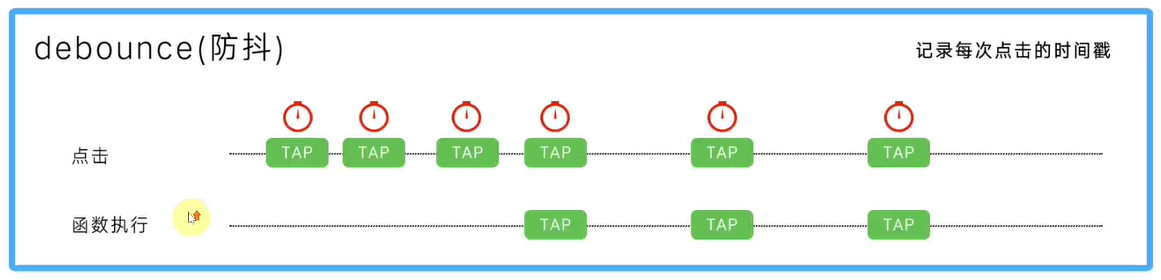
函数防抖(debounce):当持续触发事件时,一定时间段内没有再触发事件,事件处理函数 才会执行一次,如果设定的时间到来之前,又一次触发了事件,就重新开始延时
通俗来讲,就是多次连续调用函数,只有最后一次有效触发事件
适用场景:input 输入 发送请求查询数据
只有最后一次生效的版本
js
// 定时器版本核心:每次都把之前的定时器清除了,重新创建一个新的定时器,保证最后一次有效
function debounce(fn, wait) {
  let timer = null;
  return function () {
    clearTimeout(timer);

    timer = setTimeout(() => {
      fn.apply(this, arguments);
      timer = null;
    }, wait);
  };
}

// 每次输入间隔500ms执行一次,也就是暂停的最后一次生效
function handler(e) {
  console.log(e.target.value);
}
document
  .getElementById("input")
.addEventListener("input", debounce(handler, 500));- 首次点击有效的防抖版本
js
// 首次点击有效  immediate 为true表示第一次立刻执行
function debounce(fn, wait, immediate) {
  let timer = null;
  return function () {
    clearTimeout(timer);

    // 处理首次点击
    if (immediate && !timer) {
      fn.apply(this, arguments);
    }

    timer = setTimeout(() => {
      fn.apply(this, arguments);
      timer = null;
    }, wait);
  };
}

// 每次输入生效两次  第一次和 500ms到了之后的最后一次
function handler(e) {
  console.log(e.target.value);
}
document
  .getElementById("input")
.addEventListener("input", debounce(handler, 500, true));2 节流
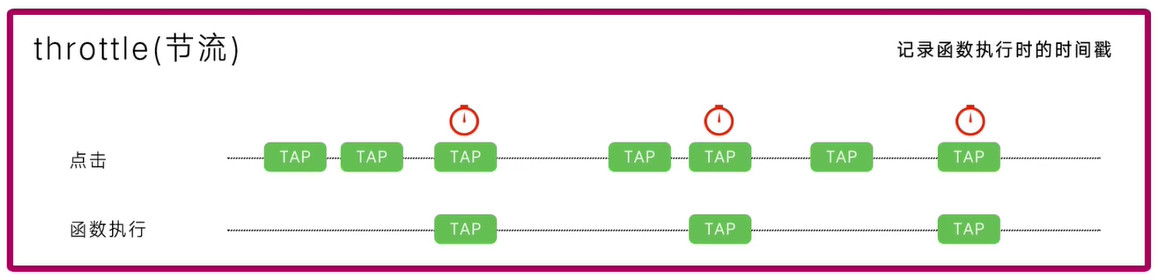
当持续触发事件时,保证一定时间段内只调用一次事件处理函数
节流通俗解释就比如我们水⻰头放水,阀⻔一打开,水哗哗的往下流,秉着勤俭节约的优良传统 美德,我们要把水⻰头关小点,最好是如我们心意按照一定规律在某个时间间隔内一滴一滴的 往下滴
适用场景:resize scroll
时间戳,第一次立刻执行
js
function throttle(fn, interval) {
  let last = 0;
  return function () {
    let now = Date.now();

    if (now - last >= interval) {
      last = now;
      fn.apply(this, arguments);
    }
  };
}

// 在滚动条滚动过程中,每隔1秒执行一次
function handle() {
  console.log(Math.random());
}
window.addEventListener("scroll", throttle(handle, 1000));- 定时器,延迟执行,即第一次不立刻执行,但是最后一次一定会延迟执行
js
function throttle(fn, delay) {
  let timer = null;
  return function () {
    if (!timer) {
      // 每次执行就创建一个定时器,让函数延迟执行
      timer = setTimeout(() => {
        fn.apply(this, arguments);
        timer = null; // 清空定时器,方便创建下一个定时器
      }, delay);
    }
  };
}

// 利用定时器延迟执行
function handle() {
  console.log(Math.random());
}
window.addEventListener("scroll", throttle(handle, 1000));- 两者结合(时间戳 + 定时器),第一次立刻执行,最后一次延迟执行
js
function throttle(fn, delay) {
  let timer = null;
  let startTime = Date.now();

  return function () {
    let curTime = Date.now();
    // 计算剩余时间
    let remaining = delay - (curTime - startTime);
    // 先清除定时器
    clearTimeout(timer);

    if (remaining <= 0) {
      // 保证第一次一定执行
      fn.apply(this, arguments);
      startTime = Date.now(); // 更新为当前时间,保证精准性
    } else {
      // 不是第一次就用定时器延迟执行
      timer = setTimeout(fn, remaining);
    }
  };
}

// 滚动第一次立刻执行,然后最后一次延迟剩余时间执行
function handle() {
  console.log(Math.random());
}
window.addEventListener("scroll", throttle(handle, 1000));四、并发计数器
js
const fs = require("fs");

function after(times, callback) {
  let arr = [];
  return (data, index) => {
    arr[index] = data; // 保证顺序 采用索引
    if (--times === 0) {
      // 多个请求并发 需要靠计数器来实现
      callback(arr);
    }
  };
}
let out = after(2, (arr) => {
  console.log(arr);
});
fs.readFile("./a.txt", "UTF8", function (err, data) {
  out(data, 0);
});
fs.readFile("./b.txt", "UTF8", function (err, data) {
  out(data, 1);
});五、发布订阅
- 发布订阅模式:目的是解耦合,核心就是把多个方法先暂存起来,最后一次执行
- 四个方法:订阅方法、发布方法、取消订阅、订阅一次
js
class EventEmitter {
  constructor(maxListeners) {
    this.maxListeners = maxListeners || Infinity;
    this._events = {};
  }
  // 订阅
  on(event, callback) {
    // 如果没有赋值为数组存储多次订阅的事件
    if (!this._events[event]) {
      this._events[event] = [];
    }

    // 设置最大监听数,可以没有
    if (
      this.maxListeners !== Infinity &&
      this._events[event].length >= this.maxListeners
    ) {
      console.log(`当前事件${event}超过最大监听数`);
      return this;
    }

    this._events[event].push(callback);
    return this; // 返回this为了链式调用
  }
  // 发布
  emit(event, ...args) {
    const callbacks = this._events[event];
    if (!callbacks) {
      console.log("当前事件没有订阅过,请先订阅");
      return this;
    }

    // 循环执行
    callbacks.forEach((cb) => cb(...args));
    return this;
  }
  // 取消订阅
  off(event, callback) {
    if (!callback) {
      this._events[event] = null; // 这里也可以不处理
    } else {
      // 过滤掉相同的回调部分
      this._events[event] = this._events[event].filter(
        (item) => item !== callback && item.l !== callback
      );
    }
    return this;
  }
  // 订阅一次
  once(event, callback) {
    // 绑定执行完毕后移除
    const one = (...args) => {
      callback(...args); // AOP切片编程
      this.off(event, one);
    };
    // 如果确定订阅依次的事件不能取消,需要单独加个标识
    one.l = callback;

    this.on(event, one);
    return this;
  }
}

// 使用
const add = (a, b) => console.log(a + b);
const minus = (a, b) => console.log(a - b);
const log = (...args) => console.log(...args);

const emitter = new EventEmitter();
emitter.on("add", add);
emitter.on("add", minus);
emitter.once("log", log);

setTimeout(() => {
  emitter.off("add", add);
  emitter.emit("add", 1, 2);
  emitter.emit("log", "a", "b");
}, 1000);

// -1
// a b六、观察者
- 观察者模式 需要有观察者和被观察者,而且被观察者需要收集观察者
js
// 被观察者的类
class Subject {
  constructor(name) {
    this.name = name;
    this.state = "非常开心";
    this.observers = []; // 收集观察者
  }
  // 收集方法
  attach(o) {
    this.observers.push(o);
  }
  // 改变状态触发更新
  setState(newState) {
    this.state = newState;
    this.observers.forEach((o) => o.update(this.name, newState));
  }
}

// 观察者
class Observer {
  constructor(name) {
    this.name = name;
  }
  // 更新方法
  update(s, state) {
    console.log(this.name + ":" + s + "当前" + state);
  }
}

// 使用
let s = new Subject("小宝宝");
let o1 = new Observer("爸爸");
let o2 = new Observer("妈妈");
s.attach(o1);
s.attach(o2);
s.setState("不开心了");
s.setState("开心了");七、call | apply | bind
- JS 中为了可以改变函数的 this 指向,内置了三个方法 call | apply | bind
- 三个函数的第一个参数都是改变 this 指向的对象,如果非严格模式下,传递 null/undefined 指向也是 window
- 三个的区别:call 和 apply 立刻执行,call 的参数是挨个传递,apply 参数是数组传递,bind 返回的是一个函数,需要执行再次执行函数
- 理论上 call 性能比 apply 要好些,因为内部少了一次参数解构,但是有了 ES6 的解构,基本差不多了,详情见call 和 apply 的性能对比
1 call
- 首先判断 this,防止直接调用,可以 throw new Error,也可以返回 undefined
- 其次判断 context 上下文,不传默认为 window
- 再次创建一个唯一的属性,添加到上下文中
- 最后执行函数,并且删除临时属性,防止污染上下文,返回结果
js
// 调用方法:fn.call(obj, a, b)
Function.prototype.myCall = function (context, ...args) {
  // 1 用于防止 Function.prototype.myCall() 直接调用
  if (this === Function.prototype) {
    return undefined;
  }
  // 2 判断上下文,如果context不传,默认为window
  context = context || window;
  // 3 使用symbol创一个唯一的属性,然后添加到上下文中
  const fn = Symbol();
  context[fn] = this;
  // 4 执行函数,传入参数
  const result = context[fn](...args);
  // 5 删除临时属性,避免污染上下文,最后并返回结果
  delete context[fn];
  return result;
};

// 测试案例
var obj = { a: 10, b: 20 };
function test(key1, key2) {
  console.log(this[key1] + this[key2]);
}
test.myCall(obj, "a", "b"); // 302 apply
- 实现类似 call,参数为数组
js
// 调用方法:fn.apply(obj, [a, b])
Function.prototype.myApply = function (context, args) {
  // 0 容错处理,参数必须为数组
  if (!Array.isArray(args)) {
    throw new Error("CreateListFromArrayLike called on non-object");
  }
  // 1 用于防止 Function.prototype.myApply() 直接调用
  if (this === Function.prototype) {
    return undefined;
  }
  // 2 判断上下文,如果context不传,默认为window
  context = context || window;
  // 3 使用symbol创一个唯一的属性,然后添加到上下文中
  const fn = Symbol();
  context[fn] = this;
  // 4 执行函数,传入参数
  const result = context[fn](...args);
  // 5 删除临时属性,避免污染上下文,最后并返回结果
  delete context[fn];
  return result;
};

// 测试案例
var obj = { a: 10, b: 20 };
function test(key1, key2) {
  console.log(this[key1] + this[key2]);
}
test.apply(obj, ["a", "b"]); // 30 注意这里是传入数组 ['a', 'b']3 bind
- 首先判断 this,防止直接调用,可以 throw new Error,也可以返回 undefined
- 其次返回一个函数,然后内部调用 call 执行
js
// 调用方法:let fn2 = fn.bind(obj, a, b)  => fn()
Function.prototype.myBind = function (context, ...args) {
  // 1 用于防止 Function.prototype.myApply() 直接调用
  if (this === Function.prototype) {
    throw new TypeError("Error");
  }
  return (...bindArgs) => this.call(context, ...args, ...bindArgs);
};

// 测试案例
var obj = { a: 10, b: 20 };
function test(key1, key2) {
  console.log(this[key1] + this[key2]);
}
var fn = test.myBind(obj);
fn("a", "b"); // 30八、new 原理
- 首先创建一个空对象,并且继承原型
- 其次执行函数
- 最后判断是函数还是对象,因为最终需要返回一个对象
js
function myNew(Fn, ...args) {
  // 1 创建一个空对象,让对象的__proto__指向构造函数的prototype
  // 等价于let target = {};  target.__proto__ = Fn.prototype;
  const target = Object.create(Fn.prototype);
  // 2 执行构造函数的代码
  let result = Fn.apply(target, args); //Fn.myApply(target , args);
  // 3 返回结果
  return typeof result === "object" || typeof result === "function"
    ? result
    : target;
}

// 测试案例
function People(name, age) {
  this.name = name;
  this.age = age;
}
var tom = new People("tom", 20); // 原生
var mike = myNew(People, "mike", 30); // 自定义
console.log(tom instanceof People, mike instanceof People); // true true九 typeof | toString
1 typeof
js
// typeof 只能判断基本数据类型,对应引用类型都是object

// 基本类型
console.log(typeof 123); //number
console.log(typeof "abc"); //string
console.log(typeof true); //boolean
console.log(typeof undefined); //undefined
console.log(typeof null); //object
console.log(typeof Symbol()); //symbol

// 引用类型
console.log(typeof [1, 2, 3]); //object
console.log(typeof {}); //object
console.log(typeof function () {}); //function
console.log(typeof Array); //function  Array类型的构造函数
console.log(typeof Object); //function  Object类型的构造函数
console.log(typeof Symbol); //function  Symbol类型的构造函数
console.log(typeof Number); //function  Number类型的构造函数
console.log(typeof String); //function  String类型的构造函数
console.log(typeof Boolean); //function Boolean类型的构造函数2 Object.prototype.toString.call
js
// 基本类型
console.log(Object.prototype.toString.call("An")); // "[object String]"
console.log(Object.prototype.toString.call(1)); // "[object Number]"
console.log(Object.prototype.toString.call(true)); // "[object Number]"
console.log(Object.prototype.toString.call(undefined)); // "[object Undefined]"
console.log(Object.prototype.toString.call(Symbol(1))); // "[object Symbol]"
console.log(Object.prototype.toString.call(null)); // "[object Null]"

// 引用类型
console.log(Object.prototype.toString.call(function () {})); // "[object Function]"
console.log(Object.prototype.toString.call({ name: "An" })); // "[object Object]"
console.log(Object.prototype.toString.call(new Date())); // "[object Date]"
console.log(Object.prototype.toString.call(/[a-z]/g)); // "[object RegExp]"
console.log(Object.prototype.toString.call(JSON)); // "[object JSON]"
console.log(Object.prototype.toString.call(Math)); // "[object Math]"十、数组相关
1 判断数组的方法
js
let arr = [1, 2, 3];

// 1 ES5中新增了Array.isArray方法,IE8及以下不支持
console.log(Array.isArray(arr));

// 2 constructor判断 - Object的每个实例都有构造函数 constructor,用于保存着用于创建当前对象的函数
console.log(arr.constructor === Array);

// 3 instanceof判断 - instanceof 主要是用来判断某个实例是否属于某个对象
console.log(arr instanceof Array);

// 4 Object.prototype.toString.call
console.log(Object.prototype.toString.call(arr) === "[object Array]");

// 5 原型链上的isPrototypeOf判断 - isPrototypeOf()可以用于检测一个对象是否存在于另一个对象的原型链上
console.log(Array.prototype.isPrototypeOf(arr));2 数组拍平
js
let arr = [[1], [2, 3], [4, 5, 6, [7, 8, [9, 10, [11]]]], 12];

// 1 ES6 - flat
console.log(arr.flat(Infinity));

// 2 toString
console.log(
  arr
    .toString()
    .split(",")
    .map((item) => Number(item))
);

// 3 stringify + 正则替换
console.log(
  JSON.stringify(arr)
    .replace(/\[|\]/g, "")
    .split(",")
    .map((item) => Number(item))
);

// 4 while
while (arr.some((item) => Array.isArray(item))) {
  arr = [].concat(...arr);
}
console.log(arr);

// 5 prototype + 自定义falt方法
Array.prototype.flat = function () {
  let result = [];
  let _this = this;
  function _flat(arr) {
    for (let i = 0; i < arr.length; i++) {
      let item = arr[i];
      if (Array.isArray(item)) {
        _flat(item);
      } else {
        result.push(item);
      }
    }
  }
  _flat(_this);
  return result;
};
console.log(arr.flat());

// 6 reduce简化
Array.prototype.flat = function () {
  return this.reduce(
    (target, current) =>
      Array.isArray(current)
        ? target.concat(flat(current))
        : target.concat(current),
    []
  );
};
console.log(arr.flat());十一、同源策略
- 1995 年,同源政策由 Netscape 公司引入浏览器。目前,所有浏览器都实行这个政策
- 定义:协议相同、域名相同、端口相同
- 同源政策的目的,是为了保证用户信息的安全,防止恶意的网站窃取数据
- 三种限制:cookie 访问限制、DOM 访问限制、Ajax 请求限制
十一、跨域问题
参考跨域相关
- jsonp
- cors
- postMessage
- document.domain
- window.name
- location.hash
- http-proxy
- nginx
- websocket
1 jsonp
js
function jsonp({ url, params, cb }) {
  return new Promise((resolve, reject) => {
    let script = document.createElement("script");

    window[cb] = function (data) {
      resolve(data);
    };

    // 处理参数 wd=b&cb=show
    params = { ...params, cb };
    let arr = [];
    for (let key in params) {
      arr.push(`${key}=${params[key]}`);
    }
    script.src = `${url}?${arr.join("&")}`;
    document.body.appendChild(script);
  });
}

// 只能发送get请求,不支持post、put、delete
// 不安全,容易出现xss攻击
jsonp({
  url: "https://sp0.baidu.com/5a1Fazu8AA54nxGko9WTAnF6hhy/su",
  params: { wd: "b" },
  cb: "show",
}).then((data) => {
  console.log(data);
});2 cors
js
// 设置哪个源可以访问我
Access - Control - Allow - Origin;
// 允许携带哪个头
Access - Control - Allow - Headers;
// 允许哪个方法
Access - Control - Allow - Methods;
// 允许携带cookie
Access - Control - Allow - Credentials;
// 预检得存活时间
Access - Control - Max - Age;
// 允许返回得头信息
Access - Control - Expose - Headers;十二、XSS 和 CSRF
1 xss
- 跨站脚本攻击 (Cross Site Scripting)
- 恶意攻击者往 Web 页面里插入恶意 Script 代码,当用户浏览该页之时,嵌入其中 Web 里面的 Script 代码会被执行,从而达到恶意攻击用户的目的
- 通常分为:反射型(非持久型)、存储型(持久型)、基于 DOM
反射型
窃取网页浏览中的 cookie 值,诱导用户点击,获取 cookie,是一次性的,需要服务端配合
js
<a href="attack.html?content=<img src='aaa.png' onerror='alert(1)'/>"></a>
<a href="attack.html?content=<img src='aaa.png' onerror='while(true)alert(/关不掉/)'/>">敏感词汇</a>存储型
在有提交表单的地方,比如评论,用户提交一段恶意脚本,将恶意的脚本存储到了服务器上,所有人访问都会造成攻击,范围更大
js
<img src="" onerror="alert(/攻击脚本/)" />DOM-Based 型
通过恶意脚本修改页面的 DOM 结构,是纯粹发生在客户端的攻击,比如修改属性、插入内容、document.write
2 xss 危害
- 窃取网页浏览中的 cookie 值
- 劫持流量实现恶意跳转
3 xss 预防
- HttpOnly 防止劫取 Cookie
- 输入、输出检查
- csp (响应的 http 头中加入 Content-Security-Policy),建立白名单,规定浏览器只能执行特定的来源代码
js
// 替换特殊标签
function escape(str) {
str = str.replace(/&/g, "&");
str = str.replace(/</g, "<");
str = str.replace(/>/g, ">");
str = str.replace(/"/g, "&quto;");
str = str.replace(/'/g, "&##39;");
str = str.replace(/`/g, "&##96;");
str = str.replace(/\//g, "&##x2F;");
return str;
}4 csrf
- 跨站请求伪造 (Cross Site Request Forgery)
- 一种劫持受信任用户向服务器发送非预期请求的攻击方式
5 csrf 防御
- 验证码
- Referer Check
- 添加 token 令牌验证
十三、Promise
1 Promise 的基础逻辑
- promise 是一个类 ,无需考虑兼容性,因为每个框架都实现不一样,只需要遵守规则即可
- 当使用 promise 的时候 会传入一个执行器(executor),此执行器是立即执行,需要传入两个函数
- promise 中有三个状态
- 等待态 Pending
- 成功态 Fulfilled
- 失败态 Rejected
- 状态只能由 pending --> fulfilled 或者 pending --> rejected,状态一旦改版不能再进行二次修改
- promise 中使用 resolve 和 reject 两个函数来改变状态
- then 方法内部就是状态判断
- 如果状态是成功的,就调用成功的回调函数
- 如果状态是失败的,就调用失败的回调函数
js
// 使用方式
const promise = new Promise((resolve, reject) => {
  resolve("success");
  // reject('error');
  // throw new Error('失败了')
});
promise.then(
  (value) => {
    console.log("success", value);
  },
  (reason) => {
    console.log("error", reason);
  }
);- 源代码
js
const PENDING = "PENDING";
const FULFILLED = "FULFILLED";
const REJECTED = "REJECTED";

class Promise {
  constructor(executor) {
    this.status = PENDING; // 默认状态
    this.value = undefined; // 成功的原因
    this.reason = undefined; // 失败的原因

    const resolve = (value) => {
      // 成功resolve函数,赋值并改变状态
      if (this.status === PENDING) {
        this.value = value;
        this.status = FULFILLED;
      }
    };

    const reject = (reason) => {
      // 失败reject函数
      if (this.status === PENDING) {
        this.reason = reason;
        this.status = REJECTED;
      }
    };

    try {
      // 执行器,立刻执行
      executor(resolve, reject);
    } catch (error) {
      // 异常捕获
      // console.log(error);
      reject(error);
    }
  }

  then(onFulfilled, onRejected) {
    if (this.status === FULFILLED) {
      // 成功回调,并传入值
      onFulfilled(this.value);
    } else if (this.status === REJECTED) {
      // 失败回调,并传入原因
      onRejected(this.reason);
    }
  }
}2 Promise 的异步逻辑和多次 then 处理
- 如果执行器中有异步函数,需要先存储回调函数,等状态改变了循环执行
- 为了满足多次 then,需要用数组存储回调函数
js
/**
 * 主线程代码立即执行,setTimeout 是异步代码,then 会马上执行,
 * 这个时候需要判断 Promise 状态,如果状态是 Pending,需要等待状态改变了再执行then方法
 */
const promise = new Promise((resolve, reject) => {
  // 异步调用
  setTimeout(() => {
    resolve("success");
  }, 1000);
});

promise.then(
  (value) => {
    console.log("success1", value);
  },
  (reason) => {
    console.log("error1", reason);
  }
);
promise.then(
  (value) => {
    console.log("success2", value);
  },
  (reason) => {
    console.log("error2", reason);
  }
);- 源代码
js
const PENDING = "PENDING";
const FULFILLED = "FULFILLED";
const REJECTED = "REJECTED";

class Promise {
  constructor(executor) {
    this.status = PENDING; // 默认状态
    this.value = undefined; // 成功的原因
    this.reason = undefined; // 失败的原因
    this.onResolvedCallbacks = []; // 存放then中成功的回调函数
    this.onRejectedCallbacks = []; // 存放then中失败的回调函数

    const resolve = (value) => {
      // 成功resolve函数,赋值并改变状态
      if (this.status === PENDING) {
        this.value = value;
        this.status = FULFILLED;

        // 执行then方法  =》 发布
        this.onResolvedCallbacks.forEach((fn) => fn());
      }
    };

    const reject = (reason) => {
      // 失败reject函数
      if (this.status === PENDING) {
        this.reason = reason;
        this.status = REJECTED;

        this.onRejectedCallbacks.forEach((fn) => fn());
      }
    };

    try {
      // 执行器
      executor(resolve, reject);
    } catch (error) {
      // console.log(error);
      reject(error);
    }
  }

  then(onFulfilled, onRejected) {
    if (this.status === FULFILLED) {
      // 成功回调
      onFulfilled(this.value);
    }
    if (this.status === REJECTED) {
      // 失败回调
      onRejected(this.reason);
    }
    if (this.status === PENDING) {
      // 等待状态
      // 包一层函数,AOP切片编程  =》 订阅
      this.onResolvedCallbacks.push(() => {
        // TODO...  可以加入额外的逻辑
        onFulfilled(this.value);
      });

      this.onRejectedCallbacks.push(() => {
        // TODO...  可以加入额外的逻辑
        onRejected(this.reason);
      });
    }
  }
}3 Promise 的链式调用
- promise 的链式调用解决了什么问题?
- 链式调用解决嵌套回调的问题
- 同步并发问题
- 多个异步处理错误问题
- 当调用 then 方法后会返回一个新的 promise
- then 中方法返回的是一个(普通值 不是 promise)的情况, 会作为外层下一次 then 的成功结果
- then 中方法 执行出错 会走到外层下一次 then 的失败结果
- 如果 then 中方法返回的是一个 promise 对象, 需要判断状态,然后根据 promise 的结果来处理是走成功还是失败 (传入的是成功或者失败的内容)
- 无论上一次 then 走是成功还是失败,只要返回的是普通值 都会执行下一次 then 的成功
- 总结:
- 如果返回一个普通值 (除了 promise) 就会传递给下一个 then 的成功,
- 如果返回一个失败的 promise 或者抛出异常,会走下一个 then 的失败
js
// 链式调用就是多次调用then方法
const promise = new Promise((resolve, reject) => {
  // 异步调用
  setTimeout(() => {
    resolve("success");
  }, 1000);
});

promise
  .then(
    (value) => {
      console.log("success1", value);
      return value;
      // return undefined;
      // return 1;
      // throw new Error('error');
    },
    (reason) => {
      console.log("error1", reason);
    }
  )
  .then(
    (value) => {
      console.log("success2", value);
    },
    (reason) => {
      console.log("error2", reason);
    }
);- 源代码
js
const PENDING = "PENDING";
const FULFILLED = "FULFILLED";
const REJECTED = "REJECTED";

class Promise {
  constructor(executor) {
    this.status = PENDING; // 默认状态
    this.value = undefined; // 成功的原因
    this.reason = undefined; // 失败的原因
    this.onResolvedCallbacks = []; // 存放then中成功的回调函数
    this.onRejectedCallbacks = []; // 存放then中失败的回调函数

    const resolve = (value) => {
      // 成功resolve函数,赋值并改变状态
      if (this.status === PENDING) {
        this.value = value;
        this.status = FULFILLED;

        // 执行then方法  =》 发布
        this.onResolvedCallbacks.forEach((fn) => fn());
      }
    };

    const reject = (reason) => {
      // 失败reject函数
      if (this.status === PENDING) {
        this.reason = reason;
        this.status = REJECTED;

        this.onRejectedCallbacks.forEach((fn) => fn());
      }
    };

    try {
      // 执行器
      executor(resolve, reject);
    } catch (error) {
      // console.log(error);
      reject(error);
    }
  }

  then(onFulfilled, onRejected) {
    /*********代码修改点*******/
    // 用于实现链式调用
    let promise2 = new Promise((resolve, reject) => {
      if (this.status === FULFILLED) {
        // 成功回调
        try {
          let x = onFulfilled(this.value);
          resolve(x); // 上一次返回的结果作为下一次then中函数的值
        } catch (e) {
          reject(e);
        }
      }

      if (this.status === REJECTED) {
        // 失败回调
        try {
          let x = onRejected(this.reason);
          resolve(x);
        } catch (e) {
          reject(e);
        }
      }

      if (this.status === PENDING) {
        // 等待状态
        // 包一层函数,AOP切片编程  =》 订阅
        this.onResolvedCallbacks.push(() => {
          try {
            // TODO...  可以加入额外的逻辑
            let x = onFulfilled(this.value);
            resolve(x);
          } catch (e) {
            reject(e);
          }
        });

        this.onRejectedCallbacks.push(() => {
          try {
            // TODO...  可以加入额外的逻辑
            let x = onRejected(this.reason);
            resolve(x);
          } catch (e) {
            reject(e);
          }
        });
      }
    });
    return promise2;
  }
}4 Promise 的 x 处理-核心逻辑
- x 可能是一个 promise,如果是 promise 需要看一下这个 promise 是成功还是失败
- 如果成功则把成功的结果调用 promise2 的 resolve 传递进去,如果失败则同理
- 总结:x 的值决定是调用 promise2 的 resolve 还是 reject
- 如果是 promise 则取他的状态
- 如果是普通值则直接调用 resolve
如果 then 方法返回的是自己的 Promise 对象,则会发生循环调用,这个时候程序会报错
js
// promise2  === x的情况
let promise2 = new Promise((resolve, reject) => {
  resolve(1);
}).then(() => {
  return promise2; // x
});

promise2.then(
  (data) => {
    console.log("x1 data", data);
  },
  (error) => {
    console.log(("x1 error", error));
  }
);

// 报错:TypeError: Chaining cycle detected for promise #<Promise>兼容 x.then 是通过 defineProperty 来定义函数的,取值可能会发生异常,需要 try catch 处理
js
// x.then
let promise2 = new Promise((resolve, reject) => {
  resolve(1);
}).then(() => {
  let p = {};
  Object.defineProperty(p, "then", {
    get() {
      throw new Error("p.then is customer function");
    },
  });
  return p.then;
});为了 then 中的 resolvePromise 能拿到 promise2,需要进行异步延时处理,官方推荐的(3 Notes)"This can be implemented with either a “macro-task” mechanism such as setTimeout or setImmediate, or with a “micro-task” mechanism such as MutationObserver or process.nextTick.",这里我们采用 setTimeout
不能采用 queueMicrotask,因为 queueMicrotask 是一个 polyfill,底层也是 promise,不能自己实现自己,详情见queueMicrotask
js
// then -> promise2
if (this.status === FULFILLED) {
  // 成功回调
  setTimeout(() => {
    try {
      let x = onFulfilled(this.value);
      resolvePromise(promise2, x, resolve, reject);
    } catch (e) {
      reject(e);
    }
  }, 0);
}resolve 中返回还是一个 promise 的情况,需要在 resolvePromise 的成功中递归调用
js
let promise2 = new Promise((resolve) => {
  resolve(1);
}).then(
  (data) => {
    return new Promise((resolve, reject) => {
      // x 可能是一个promise
      setTimeout(() => {
        // resolve中还是一个promise
        resolve(
          new Promise((resolve, reject) => {
            setTimeout(() => {
              resolve("200");
            }, 1000);
          })
        );
      }, 1000);
    });
  },
  (err) => {
    return 111;
  }
);
promise2.then(
  (data) => {
    console.log(data);
  },
  (err) => {
    console.log("error", err);
  }
);resolvePromise 函数的实现
js
// 利用x的值来判断是调用promise2的resolve还是reject
function resolvePromise(promise2, x, resolve, reject) {
  // 如果 then 方法返回的是自己的 Promise 对象,则会发生循环调用,这个时候程序会报错
  if (promise2 === x) {
    return reject(
      new TypeError("Chaining cycle detected for promise #<Promise>")
    );
  }
  // 自己写的promise 要和别人的promise兼容,考虑不是自己写的promise情况
  if ((typeof x === "object" && x !== null) || typeof x === "function") {
    // 确保了别人promise符合规范:防止别人写的promise可能调用成功后 还能调用失败
    let called = false;

    // 兼容then方法可能是通过defineProperty来实现的,取值时可能会发生异常,需要try catch处理
    try {
      let then = x.then;
      if (typeof then === "function") {
        // then 是函数的时候,表示为promise
        then.call(
          x,
          (y) => {
            // x.then调用可能会触发getter可能会发生异常,所以采用call调用
            if (called) return;
            called = true;

            // 如果then方法调用成功,需要继续递归解析,直到不是promise就停止
            resolvePromise(promise2, y, resolve, reject);
          },
          (r) => {
            if (called) return;
            called = true;

            reject(r);
          }
        );
      } else {
        // 如果then是一个对象 比如 {}  {then: {}}
        resolve(x);
      }
    } catch (e) {
      if (called) return;
      called = true;

      reject(e);
    }
  } else {
    // 说明返回的是一个普通值 直接将他放到promise2.resolve中
    resolve(x);
  }
}测试案例
js
const promise = new Promise((resolve, reject) => {
  // 异步调用
  setTimeout(() => {
    resolve("success");
  }, 1000);
});
promise
  .then(
    (value) => {
      console.log("success1", value);
      return new Promise((resolve, reject) => {
        setTimeout(() => {
          resolve("ok");
        }, 1000);
      });
    },
    (reason) => {
      console.log("error1", reason);
    }
  )
  .then(
    (value) => {
      console.log("success2", value);
    },
    (reason) => {
      console.log("error2", reason);
    }
  );

// success1 success
// success2 ok5 Promise 的值穿透
- then 中的参数是可选的,不传会默认处理
js
// 成功值穿透
new Promise((resolve) => {
  resolve(200);
})
  .then()
  .then()
  .then(
    (data) => {
      console.log(data, "s");
    },
    (err) => {
      console.log(err, "e");
    }
  );
// 200 'e'

// 失败值穿透
new Promise((resolve, reject) => {
  reject(200);
})
  .then(null)
  .then(
    (data) => {
      console.log(data, "s");
    },
    (err) => {
      console.log(err, "e");
    }
  );
// 200 's'判断 then 中的两个函数,如果不传默认就行传递,用于值穿透
js
then(onFulfilled, onRejected) {
	// 处理then中的值穿透
	onFulfilled = typeof onFulfilled === 'function' ? onFulfilled : v => v;
	onRejected = typeof onRejected === 'function' ? onRejected : err => { throw err;}

	// 用于实现链式调用
	let promise2 = new Promise((resolve, reject) => {
		// ......
	})
}6 Promise 的延迟对象
js
// 延迟对象 帮我们减少一次套用 : 针对目前来说 应用不是很广泛
// 即将promise挂到对象上,使用的时候调用对象的方法
Promise.deferred = function () {
  let dfd = {};
  dfd.promise = new Promise((resolve, reject) => {
    dfd.resolve = resolve;
    dfd.reject = reject;
  });
  return dfd;
};js
// promise延迟对象的使用
function readFile(filePath, encoding) {
  let dfd = Promise.deferred();
  // nodeApi 转化成promise
  fs.readFile(filePath, encoding, (err, data) => {
    if (err) return dfd.reject(err);
    dfd.resolve(data);
  });
  return dfd.promise;
}

readFile("./a.txt", "utf8").then((data) => {
  console.log(data);
});7 Promise A+测试
js
// 1 安装测试工具
npm install promises-aplus-tests -g

// 2 找到对应的目录
promises-aplus-tests promise4.js8 Promise 中返回 promise 的特例
js
// 成功的嵌套
new Promise((resolve, reject) => {
  resolve(
    new Promise((resolve, reject) => {
      resolve(100);
    })
  );
}).then((data) => {
  console.log(data);
});

// 失败的嵌套
new Promise((resolve, reject) => {
  reject(
    new Promise((resolve, reject) => {
      setTimeout(() => {
        resolve(100);
      }, 1000);
    })
  );
}).then(
  (data) => {
    console.log(data);
  },
  (err) => {
    console.log(err, "err");
  }
);修改源代码的 resolve 方法
js
const resolve = (value) => {
  // 成功resolve函数,赋值并改变状态
  if (value instanceof Promise) {
    return value.then(resolve, reject);
  }
  // .......
};9 Promise.resolve
js
// 使用
Promise.resolve(
  new Promise((resolve, reject) => {
    setTimeout(() => {
      resolve(200);
    }, 1000);
  })
).then((data) => {
  console.log(data); // 200
});Promise.resolve() 会创造一个成功的 promise
js
Promise.resolve = function (value) {
  return new Promise((resolve, reject) => {
    resolve(value);
  });
};10 Promise.reject
js
// 使用
Promise.reject(
  new Promise((resolve, reject) => {
    setTimeout(() => {
      resolve(200);
    }, 1000);
  })
).then(
  (data) => {
    console.log(data);
  },
  (err) => {
    console.log("err", err);
  }
);Promise.reject() 会创造一个失败的 promise
js
Promise.reject = function (value) {
  return new Promise((resolve, reject) => {
    reject(value);
  });
};11 Promise.all
多个 promise 全部完成后获取结果,如果其中某一个失败了,这个 promise 就变为失败了
js
let p1 = new Promise((resolve, reject) => {
  setTimeout(() => {
    resolve("成功1");
  }, 2000);
});

let p2 = new Promise((resolve, reject) => {
  setTimeout(() => {
    resolve("成功2");
    // reject('失败2')
  }, 1000);
});

Promise.all([p1, p2, 1, 2, 3]).then(
  (data) => {
    console.log(data);
  },
  (err) => {
    console.log("err", err);
  }
);实现原理:循环加计数器记录结果顺序
js
Promise.all = function (promises) {
  return new Promise((resolve, reject) => {
    let result = [];
    let times = 0;

    const processSuccess = function (index, data) {
      result[index] = data;
      // 判断传入的数组全部执行完成才能算成功,需要计数器,
      // 不能用result.length的长度来判断,防止最后一个先执行了长度就变了
      if (++times === promises.length) {
        resolve(result);
      }
    };

    for (let i = 0; i < promises.length; i++) {
      // 判断是否为promise
      let p = promises[i];
      if (p && typeof p.then === "function") {
        p.then((data) => {
          // 成功就放入结果集
          processSuccess(i, data);
        }, reject); // 如果其中某一个promise失败了 直接执行失败即可
      } else {
        processSuccess(i, p);
      }
    }
  });
};11 Promise.race
竞赛,返回结果采用最先执行完的一个,其他也会执行,只是不采用结果
js
let p1 = new Promise((resolve, reject) => {
  setTimeout(() => {
    resolve("成功1");
  }, 2000);
});

let p2 = new Promise((resolve, reject) => {
  setTimeout(() => {
    resolve("成功2");
    // reject('失败2')
  }, 1000);
});

Promise.race([p1, p2, 1, null]).then(
  (data) => {
    console.log(data);
  },
  (err) => {
    console.log("err", err);
  }
);实现原理:循环一次,谁先完成用谁的结果
js
Promise.race = function (promises) {
  return new Promise((resolve, reject) => {
    for (let i = 0; i < promises.length; i++) {
      let p = promises[i];
      if (p && typeof p.then === "function") {
        // 一旦成功就直接停止
        p.then(resolve, reject);
      } else {
        resolve(p);
      }
    }
  });
};一次应用,请求超时的中断处理(请求中断,图片请求中断)
js
function wrap(p1) {
  let abort;
  // 自己构造的promise,暴露一个终端方法
  let p = new Promise((resolve, reject) => {
    abort = reject;
  });
  let p2 = Promise.race([p, p1]);
  p2.abort = abort; // 如果用户调用abort方法 这个p就失败了 = p2 就失败了
  return p2;
}

// 使用
let p1 = new Promise((resolve, reject) => {
  setTimeout(() => {
    resolve("成功");
  }, 3000);
});

let p2 = wrap(p1);
p2.then(
  (data) => {
    console.log(data);
  },
  (err) => {
    console.log(err);
  }
);
setTimeout(() => {
  p2.abort("超过一秒了");
}, 1000);12 Promise 的异常
原型方法 catch,捕获异常
js
Promise.prototype.catch = function (errorFn) {
  // 透传即可
  return this.then(null, errorFn);
};

// 使用
new Promise((resolve, reject) => {
  reject(300);
})
  .then((data) => {
    console.log(data);
  })
  .catch((err) => {
    // catch方法就是没有成功的失败
    console.log("err", err);
});原型方法 finally,论如何都会执行,但是可以继续向下执行,不返回 promise,但是有等待效果
js
Promise.prototype.finally = function (cb) {
  return this.then(
    (data) => {
      // 等待cb执行完成之后,但是结果采用data
      return Promise.resolve(cb()).then(() => data);
    },
    (err) => {
      // 等待cb()后的promise完成,抛出错误
      return Promise.resolve(cb()).then(() => {
        throw err;
      });
    }
  );
};

// 使用
let p1 = new Promise((resolve, reject) => {
  setTimeout(() => {
    resolve("成功");
    // reject('失败')
  }, 3000);
})
  .finally(() => {
    // = then  无论状态如何都会执行
    console.log("finally");
    return new Promise((resolve, reject) => {
      // 不会使用promise的成功结果
      setTimeout(() => {
        resolve(1000);
      }, 1000);
    });
  })
  .then((data) => {
    console.log(data);
  })
  .catch((e) => {
    console.log("catch", e);
});13 Promise.allSettled
Promise.allSettled 表示全部成功之后返回一个结果数组
js
Promise.allSettled = function (promises) {
  return new Promise((resolve, reject) => {
    let result = [];
    let times = 0;
    const processSuccess = function (index, data) {
      result[index] = data;
      if (++times === promises.length) {
        resolve(result);
      }
    };

    for (let i = 0; i < promises.length; i++) {
      let p = promises[i];
      if (p && typeof p.then === "function") {
        // 执行p.then
        p.then(
          (data) => {
            processSuccess(i, { status: "fulfilled", value: data });
          },
          (err) => {
            processSuccess(i, { status: "rejected", value: err });
          }
        );
      } else {
        processSuccess(i, { status: "fulfilled", value: p });
      }
    }
  });
};

// 测试
const p1 = Promise.resolve(1);
const p2 = Promise.resolve(2);
const p3 = new Promise((resolve, reject) => {
  setTimeout(reject, 1000, "three");
});

Promise.allSettled([p1, p2, p3, 1, null]).then((values) => {
  console.log(values);
});

// [
// 	{status: "fulfilled", value: 1}
// 	{status: "fulfilled", value: 2}
// 	{status: "rejected", reason: "three"}
// 	{status: "fulfilled", value: 1}
// 	{status: "fulfilled", value: null}
// ]14 Promise.any
Promise.any 表示其中只要有一个成功了,就取出第一个成功的值,否则全部失败了,才会走失败
js
// 一个成功的就取第一个成功的值
const p1 = Promise.resolve(1);
const p2 = Promise.resolve(2);
const p3 = new Promise((resolve, reject) => {
  setTimeout(reject, 1000, "three");
});

Promise.any([p1, p2, p3, 3])
  .then((data) => {
    console.log("data", data);
  })
  .catch((err) => {
    console.log("err", err);
  });
// data 1js
// 全部失败才返回
const p1 = Promise.reject(1);
const p2 = Promise.reject(2);
const p3 = new Promise((resolve, reject) => {
  setTimeout(reject, 1000, "three");
});

Promise.any([p1, p2, p3])
  .then((data) => {
    console.log("data", data);
  })
  .catch((err) => {
    console.log("err", err);
    console.log(err.message);
    console.log(err.name);
    console.log(err.errors);
  });

// err:AggregateError: All promises were rejected
// All promises were rejected
// AggregateError
// [1, 2, "three"]编写源码
js
Promise.any = function (promises) {
  return new Promise((resolve, reject) => {
    let result = [];
    let times = 0;
    const processSuccess = function (index, data) {
      result[index] = data;
      if (++times === promises.length) {
        // AggregateError 浏览器内置对象
        // https://developer.mozilla.org/zh-CN/docs/Web/JavaScript/Reference/Global_Objects/AggregateError
        reject(new AggregateError(result, "All promises were rejected"));
      }
    };

    for (let i = 0; i < promises.length; i++) {
      let p = promises[i];
      if (p && typeof p.then === "function") {
        p.then(resolve, (err) => {
          // 只捕获异常
          processSuccess(i, err);
        });
      } else {
        resolve(p);
      }
    }
  });
};应用场景
- 从最快的服务器检索资源 : 来自世界各地的用户访问网站,如果你有多台服务器,则尽量使用响应速度最快的服务器,在这种情况下,可以使用 Promise.any() 方法从最快的服务器接收响应
js
function getUser(endpoint) {
  return fetch(`https://superfire.${endpoint}.com/users`).then((response) =>
    response.json()
  );
}

const promises = [
  getUser("jp"),
  getUser("uk"),
  getUser("us"),
  getUser("au"),
  getUser("in"),
];

Promise.any(promises)
  .then((value) => {
    console.log(value);
  })
  .catch((err) => {
    console.log(err);
  });
- 显示第一张已加载的图片(来自 MDN) : 有一个获取图片并返回 blob 的函数,我们使用 Promise.any() 来获取一些图片并显示第一张有效的图片(即最先 resolved 的那个 promise)
js
function fetchAndDecode(url) {
  return fetch(url).then((response) => {
    if (!response.ok) {
      throw new Error(`HTTP error! status: ${response.status}`);
    } else {
      return response.blob();
    }
  });
}

let coffee = fetchAndDecode("coffee.jpg");
let tea = fetchAndDecode("tea.jpg");

Promise.any([coffee, tea])
  .then((value) => {
    let objectURL = URL.createObjectURL(value);
    let image = document.createElement("img");
    image.src = objectURL;
    document.body.appendChild(image);
  })
  .catch((e) => {
    console.log(e.message);
});15 Node 中的 promisify
promisify 主要的功能是将一个异步的方法转化成 promise 的形式 主要是给 node 来使用的
js
const fs = require("fs");
function promisify(fn) {
  // 返回一个高阶函数
  return function (...args) {
    // 函数执行返回一个promise对象
    return new Promise((resolve, reject) => {
      // 执行对应的原函数
      fn(...args, (err, data) => {
        if (err) return reject(err);
        resolve(data);
      });
    });
  };
}
// 包装api方法
function promisifyAll(obj) {
  let o = {};
  for (let key in obj) {
    if (typeof obj[key] === "function") {
      o[key + "Promise"] = promisify(obj[key]);
    }
  }
  return o;
}
let newFs = promisifyAll(fs); // bluebird库 http://bluebirdjs.com/docs/getting-started.html
newFs.readFilePromise("./.gitignore", "utf8").then((data) => {
  console.log(data);
});15 Promise 的面试题
js
Promise.resolve()
  .then(() => {
    console.log(0);
    return Promise.resolve(4);
  })
  .then((res) => {
    console.log(res);
  });

Promise.resolve()
  .then(() => {
    console.log(1);
  })
  .then(() => {
    console.log(2);
  })
  .then(() => {
    console.log(3);
  })
  .then(() => {
    console.log(5);
  })
  .then(() => {
    console.log(6);
  });

// node环境 0 1 4 2 3 5 6
// 浏览器环境 0 1 2 3 4 5 6为什么 4 被推迟了两个时序?
- 第一种解释:
- 浏览器会创建一个 PromiseResolveThenableJob 去处理这个 Promise 实例,这是一个微任务
- 等到下次循环到来这个微任务会执行,也就是 PromiseResolveThenableJob 执行中的时候,因为这个 Promise 实例是 fulfilled 状态,所以又会注册一个它的.then()回调
- 又等一次循环到这个 Promise 实例它的.then()回调执行后,才会注册下面的这个.then(),于是就被推迟了两个时序
- 第二种解释:
- return Promise.resolve(4),JS 引擎会安排一个 job(job 是 ECMA 中的概念,等同于微任务的概念),其回调目的是让其状态变为 fulfilled,然后再继续两次 then
实现 promise 的并发控制
js
function limitLoad(urls, handler, limit) {
  const sequence = [].concat(urls);
  let promises = [];

  // 先取limit执行
  promises = sequence.splice(0, limit).map((url, index) => {
    return handler(url).then(() => {
      return index;
    });
  });

  let p = Promise.race(promises);
  // 剩下的循环,把当前第一个返回的替换掉继续竞赛
  for (let i = 0; i < sequence.length; i++) {
    p = p.then((res) => {
      promises[res] = handler(sequence[i]).then(() => {
        return res;
      });
      return Promise.race(promises);
    });
  }
}

let urls = [
  {
    info: "link1",
    time: 3000,
  },
  {
    info: "link2",
    time: 2000,
  },
  {
    info: "link3",
    time: 5000,
  },
  {
    info: "link4",
    time: 1000,
  },
  {
    info: "link5",
    time: 1200,
  },
  {
    info: "link6",
    time: 800,
  },
  {
    info: "link7",
    time: 3000,
  },
];

// 需要执行的任务
function loadImg(url) {
  return new Promise((resolve, reject) => {
    console.log("------------" + url.info + " start");
    // Fetch请求

    setTimeout(() => {
      console.log("------------" + url.info + " end");
      resolve();
    }, url.time);
  });
}

// 图片数组   图片处理函数   并发个数
limitLoad(urls, loadImg, 3);十四 Generator + Co
generator 采用的是 switch case + 有限状态机实现的
js
let regeneratorRuntime = {
  mark(genFn) {
    return genFn;
  },
  wrap(iteratorFn) {
    const context = {
      next: 0,
      done: false, // 表示迭代器没有完成
      stop() {
        this.done = true;
      },
    };
    let it = {};
    it.next = function (v) {
      // 用户调用的next方法
      context.sent = v;
      let value = iteratorFn(context);
      return {
        value,
        done: context.done, // 是否完成
      };
    };
    return it;
  },
};
("use strict");

var _marked = /*#__PURE__*/ regeneratorRuntime.mark(read);

function read() {
  var a, b, c;
  return regeneratorRuntime.wrap(function read$(_context) {
    switch ((_context.prev = _context.next)) {
      case 0:
        _context.next = 2;
        return 1;

      case 2:
        a = _context.sent;
        console.log("a", a);
        _context.next = 6;
        return 2;

      case 6:
        b = _context.sent;
        console.log("b", b);
        _context.next = 10;
        return 3;

      case 10:
        c = _context.sent;
        console.log("c", c);

      case 12:
      case "end":
        return _context.stop();
    }
  }, _marked);
}

let it = read(); // 默认没有执行
let { value, done } = it.next("abc"); // 第一次传递参数是没有意义的
// 给next方法传递参数时 他的传参会给上一yield的返回值
{
  let { value, done } = it.next("abc");
  console.log(value, done);
}
{
  let { value, done } = it.next("ddd");
  console.log(value, done);
}
{
  let { value, done } = it.next("eee");
  console.log(value, done);
}

// a abc
// 2 false
// b ddd
// 3 false
// c eee
// undefined trueCO 源码
js
const util = require("util");
const fs = require("fs");
let readFile = util.promisify(fs.readFile);
// TJ co
// const co = require('co');
function co(it) {
  return new Promise((resolve, reject) => {
    // 异步的迭代  只能用递归的方法
    function next(data) {
      let { value, done } = it.next(data);
      if (done) {
        // 如果执行完毕则 完成
        resolve(value);
      } else {
        // 原生的promise 有优化 如果是promise 内部会直接把promise返回
        Promise.resolve(value).then(next, reject);
      }
    }
    next();
  });
}
function* read() {
  let data = yield readFile("./a1.txt", "utf8");
  data = yield readFile(data, "utf8");
  return data;
}
co(read())
  .then((data) => {
    console.log(data);
  })
  .catch((err) => {
    console.log(err);
});四、事件相关
React 和 Vue 的区别
1、react 是一个 UI 组件库 vue 是一个渐进式框架 2、监听数据变化的实现原理不同
react 事件处理
性能优化
更快的网络通信
服务器通信层
- CDN 全局负载均衡 和 缓存系统(命中率和回源率)
- 资源合并 雪碧图
- 域名分片 - 多域名
数据传输层 - 缓存
- 强缓存 <- cache-control: max-age = 600 <- expires: Mon......
- 协商缓存 <- last-modified: -> if-modified-since: <- etag: -> if-none-match
数据传输层-压缩
- 数据压缩 gzip 与 新的 br
- 代码文件压缩 HTML/CSS/JS 中的注释、空格、长变量名等
- 静态资源 字体图标,去除元数据(图片的附加信息,拍摄日期等),缩小尺寸及分辨率,使用 jpg 或 webp 格式
- 头与报文 http1.1 中减少不必要的头 减少 cookie 数据量
通信协议层面-http2
- 头部压缩 http2 之前,请求头平均 460 字节的首部,http2 采用了头部压缩
- 专门的 HPACK 压缩算法 索引表 客户端和服务器同时维护一个 61 个首部键值对组成的静态表,索引表很小,不占内存 霍夫曼编码 压缩率 90%
- 二进制帧 原因:文本字符分隔的数据流,解析慢且容易出错 二进制帧:帧长度、帧类型、帧标识 》 处理速度更快
- 链路复用 不用重复建立连接
http2 中:资源合并和域名分片最好不要做
更高效的数据处理
ab -c 客户端数 -n 请求次数 -t 持续时间 地址 node --prof .\http.js node --prof-process ./iso.... Chrome Devtool
框架代码 SSG 方案
- Gatsby
- Gridsome
VueX
redux
- redux 是状态管理,主要解决组件之间复杂的数据流转
- 核心思想是:将整个应用状态存储到到一个地方,称为 store
- 里面存储了一棵状态树 state tree,一个项目只有一个 store
- store 里面有三个核心方法,
- getState 获取最新的状态
- subscribe 其他组件订阅最新的状态,来刷新自己的视图
- dispatch 接受 action,先调用 reducer 去更新 state,然后执行 subscribe 中的订阅函数
- 通常在组件中通过派发 dispatch 行为 action 给 store,而不是直接通知其它组件
react-redux
- 主要用于解决 react 与 redux 的连接问题
- 核心思想: 通过最顶层 React.createContext 的 Provide 组件包裹 store,像子组件传递 然后用 connect 高阶组件包裹子组件,在 connetc 中,如果是类组件就从 store 仓库中获取到 getState 最新状态,调用 mapStateToProps 将 state 映射到 props,调用 mapDispatchToProps 将 dispatch 映射到 props。 如果类组件通过订阅 setState 函数来触发组件更新,函数组件通过调用 useLayoutEffect 中订阅 forceUpdate 函数来触发组件更新。
redux 的中间件
- 用于解决 action 到 reducer 中间的状态变化
- 比如 redux-logger 监控状态的日志
- 比如 redux-thunk 处理函数 action,默认只能派发普通对象
- 比如 redux-promise 处理带 promise 异步的 action
- 中间件的写法,必须是一个函数,里面两层返回函数,第一次参数为 next,第二层为 action,核心就是 koa 的洋葱圈模型,在 applyMiddleware 中利用 compose 组合函数依次执行中间件,每个中间件执行完毕就调用 next 函数向下传递,最后执行完毕
- applyMiddleware 柯里化函数两端一个是 middewares 中间件数组,一个是 store.dispatch,派发方法
redux-thunk
- thunk 中间件可以让我们派发函数 funtion,函数中可以是异步调用
- 默认情况下,我们只能派发普通对象
js
function thunk({ getState, dispatch }) {
	return function (next) {//为了实现中间件的级联,调用下一个中间件
		return function (action) {//这才就是我们改造后的dispatch方法了
			if (typeof action === 'function') {
				return action(dispatch, getState);
			}
			return next(action);
		}
	}
}
export default thunk;


// 使用
 thunkAdd1() {
        return function (dispatch, getState) {
            setTimeout(function () {
                dispatch({ type: types.ADD1 });
            }, 2000);
        }
    },


// 源码
function createThunkMiddleware(extraArgument) {
  return ({ dispatch, getState }) => (next) => (action) => {
    if (typeof action === 'function') {
      return action(dispatch, getState, extraArgument);
    }

    return next(action);
  };
}

const thunk = createThunkMiddleware();
thunk.withExtraArgument = createThunkMiddleware;

export default thunk;redux-promise
redux-saga
react-router
- hash
- history
- memory
connected-react-router
- //可以把路由的最新的信息存放到仓库里保存 //在 ConnectedRouter 里会监听路径变化,并路径变化的时候派发动作给仓库,通过 reducer 保存信息
//下面这二个文件是用来实现跳转路径的
浏览器缓存
webpack5 新特性
- 持久化缓存:fileSystem memory 原理 编译会做一个快照,每次增量更新
- tree-shaking:原理类似 rollup 的深度作用域分析检测来实现
- 模块联邦:weback 的模块联邦原理和 import 相似,也是做成了预留的 promise 坑位,通过 webpackjsonp 加载,获取变成发请求获取而已