Appearance
状态模式
0、定义
TIP
1、一个对象有状态变化
2、每次状态变化都会触发一个逻辑
3、不能总用 if...else 来控制
1、设计原则验证
- 1、将状态对象和主题对象分离,状态的变化逻辑单独处理
- 2、符合开放封闭原则
2、示例
示例:交通信号灯不同颜色的变化
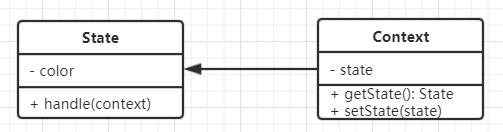
3、代码
js
// 状态 (红灯、绿灯、黄灯)
class State {
    constructor(color) {
        this.color = color
    }
    handle(context) {
        console.log(`turn to ${this.color} light`)
        // 设置状态
        context.setState(this)
    }
}

// 主体
class Context {
    constructor() {
        this.state = null
    }
    // 获取状态
    getState() {
        return this.state
    }
    setState(state) {
        this.state = state
    }
}

// test
let context = new Context()

let green = new State('green')
let yellow = new State('yellow')
let red = new State('red')

// 路灯亮了
green.handle(context)
// 打印状态
console.log(context.getState())

// 黄灯亮了
yellow.handle(context)
// 打印状态
console.log(context.getState())

// 红灯亮了
red.handle(context)
// 打印状态
console.log(context.getState())4、经典场景
4.1、有限状态机
- 有限个状态、以及在这些状态之间的变化
- 如交通信号灯
- 使用开源 lib :javascript-state-machine
- 参考地址:https://github.com/jakesgordon/javascript-state-machine
js
npm install --save-dev javascript-state-machine --registry=https://registry.npm.taobao.org

npm i jquery --save --registry=https://registry.npm.taobao.org

<button id="btn1"></button>

import StateMachine from 'javascript-state-machine'
import $ from 'jquery'

// 初始化状态机模型
let fsm = new StateMachine({
    init: '收藏',
    transitions: [
        {
            name: 'doStore',
            from: '收藏',
            to: '取消收藏'
        },
        {
            name: 'deleteStore',
            from: '取消收藏',
            to: '收藏'
        }
    ],
    methods: {
        // 监听执行收藏
        onDoStore: function () {
            alert('收藏成功') // 可以 post 请求
            updateText()
        },
        // 监听取消收藏
        onDeleteStore: function () {
            alert('已经取消收藏') // 可以 post 请求
            updateText()
        }
    }
})

let $btn = $('#btn1')

// 按钮点击事件
$btn.click(function () {
    if (fsm.is('收藏')) {
        fsm.doStore()
    } else {
        fsm.deleteStore()
    }
})

// 更新按钮的文案
function updateText () {
    console.log(fsm.state);
    $btn.text(fsm.state)
}

// 初始化文档
updateText()4.2、写一个简单的 Promise
js
import StateMachine from 'javascript-state-machine'

// 初始化状态机模型
let fsm = new StateMachine({
    init: 'pending', // 初始化状态
    transitions: [
        {
            name: 'resolve', // 事件名称
            from: 'pending',
            to: 'fullfilled'
        },
        {
            name: 'reject', // 事件名称
            from: 'pending',
            to: 'rejected'
        }
    ],
    methods: {
        // 监听 resolve
        onResolve: function (state, data) {
            // state - 当前状态机实例; data - fsm.resolve(xxx) 传递的参数
            data.successList.forEach(fn => fn())
        },
        // 监听 reject
        onReject: function (state, data) {
            // state - 当前状态机实例; data - fsm.reject(xxx) 传递的参数
            data.failList.forEach(fn => fn())
        }
    }
})

// 定义 Promise
class MyPromise {
    constructor(fn) {
        this.successList = []
        this.failList = []

        let self = this;
        fn (function () {
            // resolve 函数
            fsm.resolve(self)
        }, function () {
            // reject 函数
            fsm.reject(self)
        })
    }
    then(successFn, failFn) {
        this.successList.push(successFn)
        this.failList.push(failFn)
    }
}

// 测试代码
function loadImg(src) {
    const promise = new MyPromise(function(resolve, reject) {
        let img = document.createElement('img')
        img.onload = function () {
            resolve(img)
        }
        img.onError = function () {
            reject()
        }
        img.src = src
    })
    return promise
}

let src = 'https://ss2.baidu.com/6ONYsjip0QIZ8tyhnq/it/u=296930828,2685283461&fm=173&app=25&f=JPEG?w=218&h=146&s=5ECA722382C74AFA0FB548D70100A0A1'
let result = loadImg(src)

result.then(function () {
    console.log('ok1')
}, function () {
    console.log('fail1')
})

result.then(function () {
    console.log('ok2')
}, function () {
    console.log('fail2')
})